What is Cloud Computing
Get a better understanding of cloud computing and how it works.


Imagine you're a photographer who has captured breathtaking moments throughout your travels. Your camera has thousands of high-resolution photos, each representing a unique memory. However, as you accumulate more and more images, you begin to face a problem - where do you store them all?
This scenario highlights a familiar dilemma individuals and businesses face in the digital age. With the exponential growth of data and the need for secure and accessible storage, traditional methods are often insufficient. This is where cloud computing comes to the rescue.
A few years back you might have transferred all these images to your computer or a backup drive, but in 2023, the chances that you save them on a cloud service such as Dropbox, Google Drive, or OneDrive are higher. But have you ever thought about how these services work, where they store the data, and how they make it accessible to you over the Internet?
If you think about it, the foundation remains the same. It is still a computer located somewhere else instead of your home. We call this computer a server in the cloud. The computer has the storage where your photographs are stored. In addition, this computer is connected to the internet and runs special software that makes it possible for you to store and retrieve your pictures from it. That's basically what we mean when we talk about cloud computing.
In cloud computing, the term cloud is used metaphorically to represent the idea that the exact location of the computer and the data storage is abstracted and hidden from the end-user. The end users don’t have to worry about the physical location of the servers. Instead, they just focus on what they need to do on the server (In our example, manage photographs).
Let’s understand how cloud computing fits into the business scenario.
On-premise - Traditional way of deploying software
Traditionally, software companies installed their software on the buyers' own servers, which are typically located on the buyers' premises. This arrangement is known as an on-premise deployment model. The servers would be accessible to the company's employees over their own network. This approach has been the standard practice for software delivery for many years.
However, this method has many disadvantages:
You have to make a huge upfront investment in buying these servers, storage, and networking. This is what we call Capital Expenditure. Depending on the type of software business, this cost could run into millions, and was one of the biggest hurdles in getting into a software business (It was literally an expensive business!).
Scaling is really difficult. If the demand is growing, you would need to physically add more computers or replace the existing ones with bigger computers to meet the demand. This is costly and time-consuming and sounds like a hassle.
You have to maintain this infrastructure, which means you need to invest in space, power, and air conditioning and also have dedicated IT resources and experts that maintain this infrastructure and software.
There are also other disadvantages such as managing downtime, security and backups.
On the cloud - The new way
While the idea of the cloud has been around for quite some time, things really changed when in 2006, Amazon Web Services (AWS) was launched and they came up with their first service called Elastic Compute Cloud (EC2). You can think of EC2 as really large computers accessible over the internet, which you could access by paying a fee to AWS. These large computers, instead of calling them servers, AWS called them instances. Once you had access to an instance, you could do anything on it, just like you would do on your own home computer or an on-premise server. AWS EC2 was the first cloud computing service that was made available to the public.
The idea is very simple. Instead of buying your own servers, you could just rent the servers on AWS, run your software on it and access it over the internet.
This marked a revolutionary change.
Rent vs. buy: Instead of buying, you could rent servers at a small fee. Your CapEx has turned into OpEx.
Easy to switch providers: Since you are paying monthly (or sometimes yearly), it’s easy for you to switch providers. Currently, the four largest players are Amazon AWS, Google Cloud, Microsoft Azure, and Alibaba Cloud. Apart from this, there are plenty of small and vertical players. If you are not happy with one cloud provider, you are not tied to them for life. You can easily move from one provider to another in a matter of weeks.
No maintenance: All the maintenance and upgrades of the cloud are done by the cloud provider, so you don’t have to do it.
More secure: When you maintain your own on-premise infrastructure, you are responsible for security and data protection. However, in the case of cloud computing, the cloud providers are responsible for it. Cloud providers dedicate significant resources on security, and the general industry perception is that a cloud server is much more secure than any on-prem server.
How is the Cloud Organized?
As we mentioned, a server is just a large computer. However, it doesn’t look like a PC or a laptop. It doesn’t need many things that a typical computer has such as a screen or a keyboard. Servers have multiple CPUs, multiple hard drives and large amounts of RAM. Servers are designed to be space efficient. There are many types of servers such as rack-mountable servers, blade servers, and tower servers. Servers typically look like below:
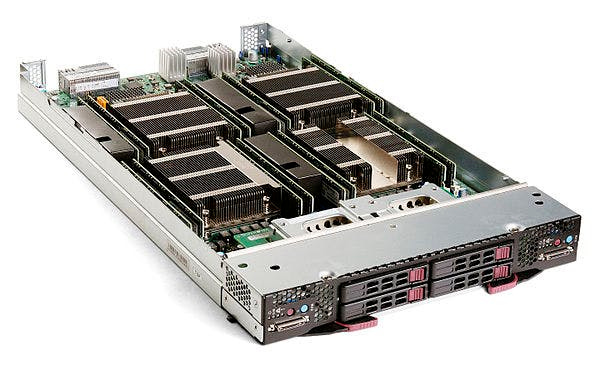
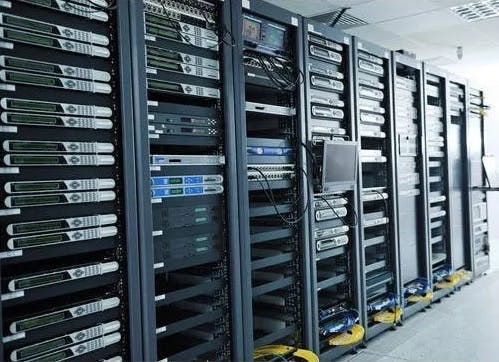
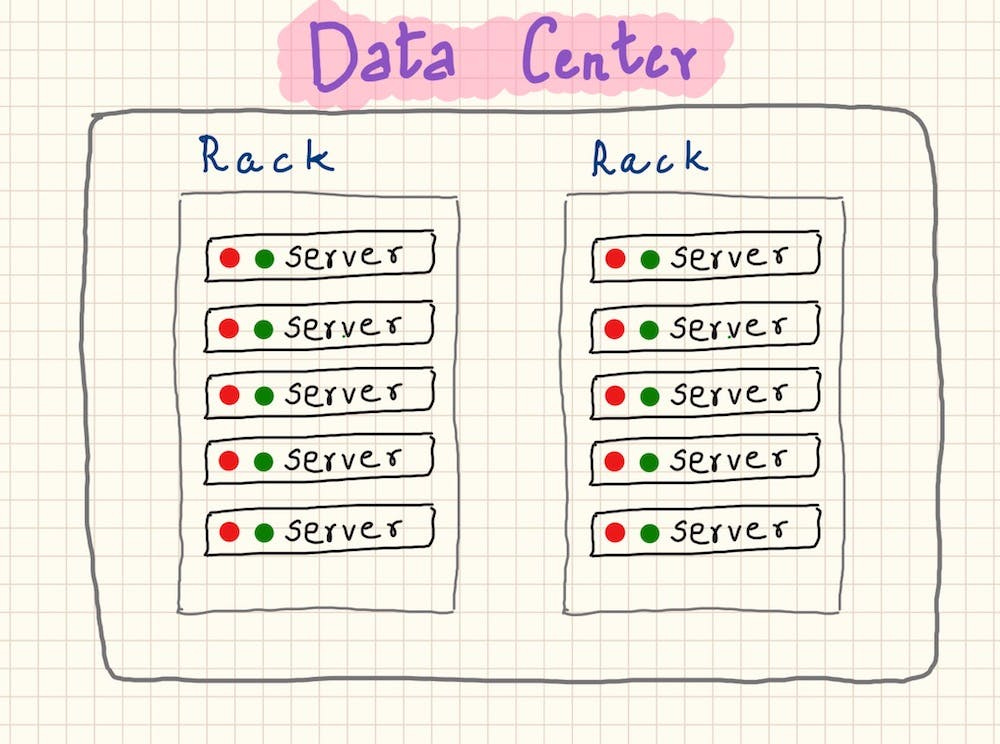
The physical place where servers are stored is called a data centre. A data center will have many racks, and each rack will hold many servers typically stacked over one other. This will include, servers, networking equipment, storage devices, and other equipment needed to connect and power the servers.
The racks with servers in a data center look something like this:
Types of Cloud
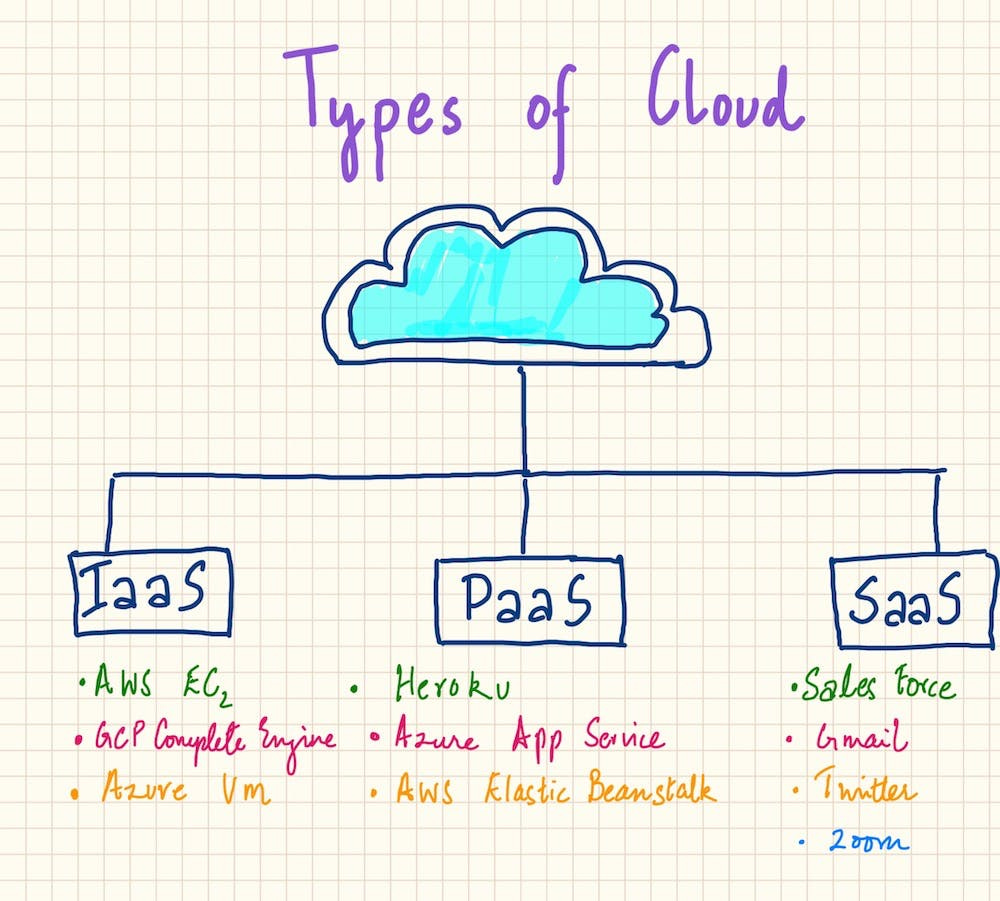
There are three main models for cloud computing services: Infrastructure as a Service (IaaS), Platform as a Service (PaaS), and Software as a Service (SaaS). Let’s look at each of them in detail:
Infrastructure as a Service (IaaS): This is the most basic form of a cloud where you get the very basic elements a computer should have. This is like renting a computer. You get the necessary hardware over the internet, but you're responsible for the software. This includes the operating system, applications, and other components. You can customize and control everything, but you also have to manage everything yourself. Some examples of IaaS are Amazon's EC2, Google Compute Engine, And Microsoft Azure’s virtual machines. Since you are getting the most basic infrastructure, IaaS is the cheapest cloud offering.
Platform as a Service (PaaS): In PaaS, a few things are already installed and configured for you. It’s like a pre-set computer that comes with a few software such as the operating system and a few other software pre-installed. You don't have to worry about the operating system or lower-level infrastructure. This makes it easier for you to start and you can just focus on developing, running, and managing your application. This is good for developers who want to focus on their code without worrying about the underlying system. Google App Engine is an example of PaaS. Some other examples are Heroku, Microsoft Azure App Service, AWS Elastic Beanstalk, Amazon RDS, and GCP Big Query. We will learn about what these services exactly do in another article.
Software as a Service (SaaS): SaaS has become the most popular software distribution model in the world. This is when a vendor builds fully-featured software and makes it available over the cloud to its end users. You don't have to worry about the underlying hardware or software at all. You just use the application, and the provider takes care of everything else. This is the most user-friendly type of cloud service, and it's what most people think of when they hear "cloud computing". Examples include Google's Gmail, Microsoft's Office 365, Twitter, Salesforce, Zoom, Slack, Dropbox and many other software that you use every day.
How Companies Deploy Cloud?
Earlier we discussed cloud servers provided by large players such as Amazon AWS, Google Cloud Platform (GCP), and Microsoft Azure. All these cloud servers are available for anyone to purchase and are generally referred to as public cloud. This is like rental properties that are available for anyone to book and use.
Instead of a public cloud, a company sometimes may choose to build its own cloud where this cloud is exclusively available for this company. This is called a private cloud. It's like owning your own home. A company may have their private cloud located in its own data center, or it can be hosted by a third-party service provider.
Sometimes companies may want to deploy a combination of public and private clouds. It's like having a house and also renting a vacation home. This could be for security reasons where they will use a private cloud for tasks that need to be more secure and a public cloud for the rest of the tasks. Such an arrangement is called a hybrid cloud.
Sometimes companies may go for a multi-cloud model where they will use multiple cloud services from different cloud providers. This helps them avoid vendor lock-in, increase reliability, and take advantage of the best features from each cloud provider. As an example, a company may use Amazon EC2 for their compute infrastructure (basic hardware), they may use Google Cloud Platform (GCP) for Big Data Analysis, Amazon RDS or Azure's Cosmos DB for hosting their database, and use IBM Watson for their Artificial Intelligence and Machine Learning needs. This way they get the best of each cloud provider.
Thanks for making it to the end of this article! We've covered the key concepts and terms of cloud computing you should know. Hopefully, this piece has shed some light on the subject, making it a bit less mysterious. So, next time cloud computing pops up in a meeting or a chat with clients, you'll be ready to dive right in. Until next time, keep learning!